Finding the Name of a Report You Want to Execute
Finding the Name of a Report You Want to Execute 
Prerequisites
You can search for a report name even when you do not know the exact name of a report.
Procedure
- Choose System ® Services ® Reporting.
The report selection screen appears.
- Choose Utilities ® Find Program. Or, choose the possible entries icon
 for Program, and select an entry from the dropdown list box.
The report search screen (ABAP Program Directory) appears:
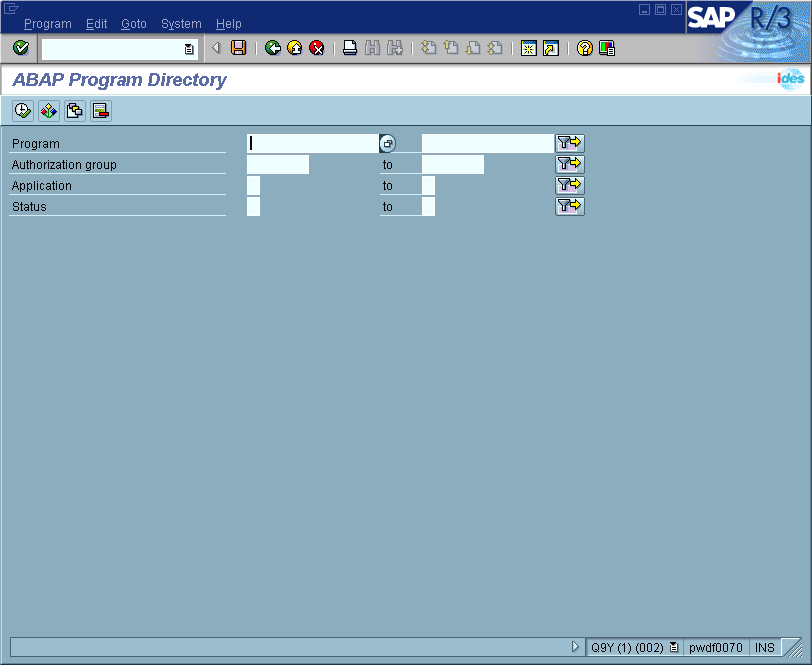
- In the Program field, enter any part of the report name that you know, plus any wildcards ( * or + ), as needed.

|
Wildcard |
Represents |
|
* and + |
Characters you do not know |
|
* |
Multiple characters |
|
+ |
Exactly one character |
Use the * and + anywhere in the report name, as often as necessary. For example:
|
Character |
Represents all report names... |
|
z* |
Starting with z |
|
*sale* |
Containing the character string sale, such as rvsale07 |
|
*f+ |
Containing an f as the second-to-last character, such as rmlogifa |
|
rp+++sch |
Starting with rp, ending in sch, and containing any three characters in between, such as rp012sch or rpinvsch |
The report name can be upper- or lowercase; for example, RF is the same as rf.
- Choose Execute.
A list of reports appears.
- Place the cursor on the report name, and choose Choose. Or, double-click the report name.
- Choose Program ® Execute.
If the report does not require a variant, the selection criteria screen for the report appears.
If the report requires a variant, the system displays a message stating that you cannot select the report from this screen. Return to the report selection screen (choose  , or press F3 ), and then enter the report and variant name. Before leaving this screen, note the name of the report. (For more information, see Report Variants.)
- Enter the selection criteria.
- Choose Program ® Execute.
The system executes the report and displays the resulting data.
Additional Information
Created with the Personal Edition of HelpNDoc: Free Qt Help documentation generator